Tempest vs Ambient Weather Stations: Which Is Better? (October 2026)
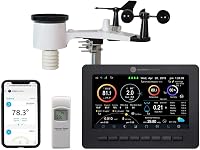
Choose Tempest for app-first monitoring and a no-moving-parts sensor; choose Ambient Weather WS-2000 for a dedicated color console. This Tempest vs Ambient Weather comparison also covers the WS-2902 option.
On this page (9 sections)
- Tempest vs Ambient Weather: which station should you choose?
- How do their screens and apps compare?
- Which model fits a smart home?
- What should you know about power and upkeep?
- How should you plan mounting and wireless range?
- How do you set up a home weather station?
- What common buying mistakes should you avoid?
- Is the WS-2902 or WS-2000 the better Ambient choice?
- How should you make the final Tempest vs Ambient Weather decision?
Choose Tempest for app-first weather monitoring, or choose Ambient Weather if you want a dedicated color console. This Tempest vs Ambient Weather comparison also covers the WS-2902, the better fit for buyers who want named smart home connections.
The main choice is how you want to check local readings: on your phone or on a screen at home. Tempest has one outdoor sensor and no console, while both Ambient models pair an outdoor array with an indoor display.


Tempest vs Ambient Weather: which station should you choose?
Choose Tempest if you prefer app-based readings and a single outdoor sensor; choose Ambient Weather if you want a console beside you at home. The WS-2902 adds named smart home connections, while the WS-2000 stands out for its high-definition TFT console and calibration options.
Tempest tracks a wider set of conditions, including lightning, dew point, barometric pressure and solar radiation. Both Ambient models cover core outdoor readings such as wind, temperature, humidity, rainfall, UV and solar radiation.
The best match depends on your routine, not just the number of measurements. Think about whether you check the weather while away, glance at it indoors, connect it to household devices, or mainly want a local record for gardening and outdoor plans.
Who should buy Tempest?
Tempest suits people who want to check backyard conditions in an app and value a compact, single-device outdoor setup. Its non-mechanical design also appeals if you want fewer moving parts to inspect.
WeatherFlow says the solar-powered sensor transmits wirelessly up to 1,000+ feet and sends real-time updates every 3 seconds. The system also names Alexa, Rachio and IFTTT integrations for weather-based automations.
Skip Tempest if you want a dedicated screen in your kitchen or living room. It has no display, so app access or connected services are central to the experience.
Who should buy Ambient Weather?
Ambient Weather is a better fit if you want to read conditions from an indoor console as well as use Wi-Fi access. The WS-2902 is the pick for a color display with named smart home connections, while the WS-2000 suits buyers who value its TFT console and calibration features.
The WS-2902 names IFTTT, Google Home and Alexa, and supports alerts and remote access. The WS-2000 supports imperial and metric units and lets you calibrate major parameters.
Skip either Ambient model if you don't want a console or a separate outdoor sensor array. Also account for the array's battery needs and the mounting pole, which is not included with the WS-2902.
What does each station measure?
Tempest measures temperature, humidity, barometric pressure, wind speed and direction, dew point, solar radiation, UV, lightning strikes and rainfall. The readings come from its one outdoor unit.
The WS-2000 array measures wind speed and direction, temperature, humidity, rainfall, UV and solar radiation. It can also receive indoor temperature, humidity and barometric pressure from an optional indoor sensor sold separately.
The WS-2902 supports the core outdoor readings and Wi-Fi monitoring. If a particular measurement is essential to your plans, check that model's full setup details before choosing.
How do their screens and apps compare?
Ambient Weather wins for an at-home display; Tempest is the app-first option. Choose based on where you want the information to appear during an ordinary day.
The WS-2000 has a high-definition, full-color TFT screen with light and dark backgrounds. It shows outdoor readings alongside calculated information such as feels-like temperature, dew point, sunrise, sunset and forecast.
The WS-2902 includes an LCD color display, remote monitoring and alerts. Its Ambient Weather Network dashboard can be customized and used to share local conditions.
Tempest doesn't include an indoor console. If you want a screen you can glance at without opening an app, see our guide to weather stations with a large display.
Which model fits a smart home?
Pick the model that names the services you already use. Tempest names Alexa, Rachio and IFTTT; the WS-2902 names IFTTT, Google Home and Alexa.
WeatherFlow describes Tempest as a source of real-time backyard weather data for automating lights, thermostats and irrigation through supported services. Confirm that the service you plan to use supports your intended routine.
Both Ambient models support Wi-Fi monitoring and data sharing. The WS-2902 has the clearest named smart home fit, while the WS-2000 is a better match if its console and calibration functions matter more.
For a broader look at connected stations, read our smart weather station guide. Our Ambient Weather station guide covers additional options from the brand.
What should you know about power and upkeep?
Tempest keeps the outdoor setup simple with solar power and no moving parts; Ambient's arrays also use solar power but have battery details to plan for. Each system still needs a well-chosen mounting spot and occasional attention.
The WS-2000 console uses its included 5V DC adapter. Its outdoor array uses a solar panel with optional battery backup and requires 3 AAA batteries.
The WS-2902 array is solar powered and requires 3 AAA batteries. The console comes with an AC adapter, so plan for an indoor outlet.
Tempest is solar powered and includes a lithium-ion battery. WeatherFlow describes its no-moving-parts construction as engineered for years of near-zero maintenance, but you should still follow its care instructions and check the sensor periodically.
Don't assume solar power means you can ignore placement. Keep the outdoor unit accessible enough for inspection, and choose a location that is suitable for the readings you want.
How should you plan mounting and wireless range?
Check both the mounting surface and the path between the sensor and console before buying. A stated open-air range is not a promise of the same signal through walls or obstacles.
The Ambient WS-2000 and WS-2902 arrays connect to their consoles up to 330 feet in open air, with about 100 feet under most conditions. Their wireless signal won't pass through solid metal, earth or ground.
The WS-2902 array mounts to a pole between 1.25 and 2 inches in diameter. The pole isn't included, so factor in a compatible mounting surface before settling on that model.
Tempest's outdoor sensor transmits wirelessly up to 1,000+ feet. Measure the likely distance and consider walls, sheds and other obstructions when choosing where to put the sensor and where you'll use the app.
Our guide to roof mounts and tripods for weather stations can help you choose a stable location. For a plain-language overview of sensor roles, read how a home weather station works.
How do you set up a home weather station?
Start by choosing the outdoor location, then position the indoor console or confirm app access. A little planning before assembly can prevent poor readings and avoidable connection problems.
For Ambient, decide where the console will sit and where the outdoor array can be mounted on a compatible pole. Keep the console within the sensor's practical wireless path, and place it where you can see its screen and reach its power adapter.
For Tempest, choose an outdoor position that you can access and that suits your local weather monitoring needs. Then pair the system with the app and any smart home service you plan to use.
After setup, allow readings to settle and compare them with what you observe around the property. If a value looks implausible, review the placement and calibration options before assuming the sensor is faulty.
What common buying mistakes should you avoid?
The most common mistake is choosing by feature count before deciding how you'll use the readings. A screen, an app, a mounting pole and power needs can matter more in daily use than one extra measurement.
Don't buy Tempest expecting a console. Its app-first approach is a clear advantage for remote checking, but it won't provide an indoor screen.
Don't treat all Ambient models as identical. The WS-2902 and WS-2000 share a console-and-array format, but their named connections and console features differ.
Finally, don't plan an outdoor installation around the maximum wireless range alone. Obstacles and the actual layout of your home can affect the connection, so think through sensor placement before mounting.
Is the WS-2902 or WS-2000 the better Ambient choice?
Choose the WS-2902 for named smart home connections and alerts; choose the WS-2000 for its high-definition TFT console, calibration and unit options. Both pair an outdoor sensor array with Wi-Fi features.
The WS-2000 supports imperial and metric units and calibration. Its console can show multiple screens and provide alarms.
The WS-2902 emphasizes remote monitoring, alerts and the Ambient Weather Network. Its named integrations include IFTTT, Google Home and Alexa.
If you're comparing Ambient models beyond these two, see Ambient Weather WS-5000 vs WS-2000. That guide can help you decide whether a different Ambient station better matches your needs.
How should you make the final Tempest vs Ambient Weather decision?
Choose Tempest for app-first access, a single solar-powered outdoor sensor and no moving parts; choose the WS-2902 for its named smart home connections or the WS-2000 for its dedicated TFT console. Start with the way you expect to check conditions every day.
If you rarely want to reach for your phone at home, favor an Ambient console. If remote access is your priority and a screen is unnecessary, Tempest is the more natural fit.
Before ordering, map out the sensor location, indoor power access and wireless path. Our backyard weather station guide can help you weigh those practical details across station types.
Frequently asked questions
Is Tempest better than Ambient Weather?
Tempest suits you if you want app-first access, a solar-powered outdoor sensor and a design with no moving parts. Ambient Weather suits you if you want a dedicated color console.
Compare the Tempest with the WS-2000 or WS-2902 based on how you prefer to check readings.
Does Tempest come with a display?
No. Tempest has no display, so you check its readings through its app or connected services.
The Ambient Weather WS-2000 and WS-2902 include color consoles, which can make at-home checks easier when you don't want to open a phone app.
Can Ambient Weather stations connect to Wi-Fi?
Yes. The WS-2000 and WS-2902 support Wi-Fi for remote monitoring and sharing data with the Ambient Weather network.
The WS-2902 also names IFTTT, Google Home and Alexa among its smart home connections.
Which station is easier to maintain?
Tempest has no moving parts, and WeatherFlow describes it as engineered for years of near-zero maintenance. The Ambient Weather stations use an outdoor sensor array, so consider each model's care instructions and mounting needs before choosing.
Should I choose the WS-2000 or WS-2902?
Choose the WS-2000 if its high-definition TFT color console and calibration options fit your needs. Choose the WS-2902 if you want a color display with Wi-Fi remote access and named smart home connections.
Compare the console and setup features before deciding.