8 Best Smart Weather Stations for Your Home (October 2026)
The best smart home weather stations include the Ambient Weather WS-2902 for all-around yards, the Ambient Weather WS-2000 for console controls, and the Ambient Weather WS-5000 for moving-part-free wind.
On this page (5 sections)
The Ambient Weather WS-2902 is the best smart weather station for most homes, combining a color console, backyard readings, Wi-Fi monitoring, and Alexa or Google Home support. For indoor air quality, consider Netatmo; for wind sensing without moving parts, look at the WS-5000.
A smart weather station connects local readings to an app, network, or home assistant. The right fit depends on which readings you need, where you want to see them, and how you plan to use connected features.
For help choosing a sensor location, start with our backyard weather station guide. If you are comparing broader setups, see the best weather stations for home use.
Our picks at a glance
-
1

-
2

-
3
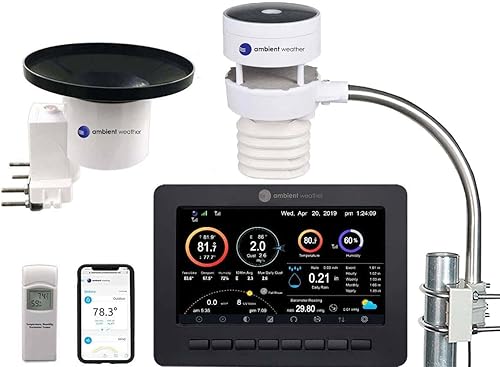
Which smart weather station fits your home?
The WS-2902 is the strongest all-around choice here, while the other stations stand out for a specific display, sensor, or connected feature. Choose based on the readings you'll use and how you want to view them.
| Product | Best for | Display | Connectivity | Weather readings | Our score |
|---|---|---|---|---|---|
| Ambient Weather WS-2902 | all-around yards | LCD color display | Wi-Fi; Alexa and Google Home support | Wind, temperature, humidity, rainfall, UV, and solar radiation | 9.1 |
| Ambient Weather WS-2000 | console controls | Full-color TFT | Wi-Fi publishing option | Wind, rainfall, temperature, humidity, UV, and solar radiation | 8.8 |
| Ambient Weather WS-5000 | moving-part-free wind | Radio frequency to console; optional Wi-Fi publishing | Wind, rain, temperature, humidity, UV, and solar radiation | 8.5 | |
| Sainlogic 5G Wi-Fi Station | dual-band Wi-Fi | 5 GHz or 2.4 GHz Wi-Fi | Wind, rainfall, temperature, humidity, and pressure | 8.2 | |
| Ambient Weather WS-1965 | core backyard readings | Color LCD | Wi-Fi; Ambient Weather Network | Wind, rainfall, temperature, humidity, and pressure | 7.9 |
| Netatmo Smart Weather Station | indoor air checks | 2.4 GHz Wi-Fi | 7.5 | ||
| Raddy WF-120P 10-Inch | large-screen viewing | 10-inch color display | Wi-Fi and Tuya Smart app | Temperature, humidity, pressure, wind, rain, UV, and sunlight | 7.2 |
| AcuRite Optimus Wi-Fi | lightning alerts | High-definition LCD | Wi-Fi and radio frequency | Temperature, humidity, rain, wind, and lightning | 7.1 |
The smart weather stations we recommend
These picks cover different priorities, from general yard monitoring to indoor air readings and lightning detection. Compare the setup needs and key trade-offs before choosing a station.
Ambient Weather WS-2902: Best for all-around yards
- Color LCD display
- Wi-Fi remote monitoring and alerts
- Wind, temperature, humidity, rain, UV, and solar readings
- Alexa and Google Home support
The WS-2902 combines a local color display with remote monitoring and smart home support. Its sensor array covers common backyard weather readings.
Pros
- Color display and remote monitoring
- Alerts and smart home programming
- Measures wind, rain, UV, and solar radiation
Cons
- Outdoor array needs a suitable mounting pole
- Wi-Fi is needed for remote access
The WS-2902 is the strongest all-around choice if you want a console at home and weather data you can check remotely. Its sensor array measures wind speed and direction, temperature, humidity, rainfall, UV, and solar radiation.
The color LCD gives you a local view, while Wi-Fi enables remote monitoring and alerts. Ambient Weather names Alexa and Google Home support, so it can also fit a home setup that uses those assistants.
The outdoor array mounts to a pole between 1.25 and 2 inches in diameter. It connects to the console by radio frequency, so plan a suitable outdoor spot and a path back to the display.
Choose it if you want broad backyard readings, a local screen, and remote access in one package. Skip it if you only want indoor air readings or have no practical way to mount the array; the Netatmo is a better fit for room conditions.
For help weighing sensor designs, compare the ultrasonic and mechanical weather station sensors.
Ambient Weather WS-2000: Best for console controls
- Full-color TFT console
- Wireless array for wind, rain, temperature, humidity, UV, and solar readings
- Imperial or metric units
- Calibration and alarms
The WS-2000 pairs a detailed full-color console with a sensor array and optional Wi-Fi publishing. Its alarms, unit choices, and calibration options suit readers who want more control at the display.
Pros
- Full-color console with light and dark backgrounds
- Imperial and metric units
- Calibration and audible alarms
Cons
- Indoor sensor is optional and sold separately
- Wi-Fi publishing is an optional setting
The WS-2000 suits you if you want to make more adjustments from a dedicated console. Its full-color TFT display offers light and dark backgrounds, imperial or metric units, alarms, and calibration for major parameters.
The outdoor array measures wind, rainfall, temperature, humidity, UV, and solar radiation. An optional indoor sensor, sold separately, adds indoor temperature, humidity, and pressure to the console.
Wi-Fi publishing is an option for sending station data to the Ambient Weather Network. Pick this model if you value display controls and adjustable readings; skip it if you want indoor measurements included in the box or prefer a simpler setup.
If screen size is a deciding factor, see our guide to weather stations with large displays.
Ambient Weather WS-5000: Best for moving-part-free wind
- Ultrasonic sensor array with no moving parts
- Five-second weather updates
- Rain cup and indoor/outdoor sensor
- Alexa and Google Home support
The WS-5000 uses an ultrasonic array without moving parts and updates weather conditions every five seconds. It includes a rain cup, indoor/outdoor sensor, and full-color console.
Pros
- Ultrasonic wind sensing without moving parts
- Five-second updates
- Smart home alerts and programming
Cons
- Sensor array needs a suitable mounting pole
- The console and array communicate by radio frequency
The WS-5000 is the standout option if you want ultrasonic wind sensing without moving parts. Its array updates weather conditions every five seconds and pairs with a full-color console.
The system includes a rain cup and an indoor/outdoor sensor for temperature, humidity, and pressure. It also measures wind, rain, UV, and solar radiation, and supports Alexa and Google Home.
The array mounts to a pole between 1.25 and 2 inches in diameter. Its radio range is up to 1,000 feet line of sight in open air, with a shorter range under most conditions.
Choose it if wind monitoring is a priority and you want fast updates. Skip it if the ultrasonic design does not matter to you and a simpler, less specialized station already covers your needs.
Sainlogic 5G Wi-Fi Station: Best for dual-band Wi-Fi

- 5 GHz and 2.4 GHz Wi-Fi
- Alexa and compatible platform support
- Two years of local data storage and Excel export
- Wind, rain, temperature, humidity, and pressure readings
Sainlogic offers two Wi-Fi bands, remote access, and local history that can be exported to Excel. Its readings include common outdoor weather measures along with pressure.
Pros
- Supports 5 GHz and 2.4 GHz Wi-Fi
- Stores up to 2 years of local data
- Excel export and Alexa support
Cons
- Smart home support varies by compatible platform
- The outdoor sensor needs an open placement for its stated range
Sainlogic fits a home where the router supports either 5 GHz or 2.4 GHz Wi-Fi and you want a longer local record. It stores up to two years of weather data and can export that history to Excel.
Its readings cover temperature, humidity, pressure, wind, and rainfall, along with trends and a forecast. It also supports Alexa and compatible platforms for remote monitoring.
The stated wireless range is 443 feet in open areas. Treat that as a placement reference, since walls and other obstacles can reduce the distance between the outdoor sensor and display.
Choose it if you want data export, longer local history, or a choice of Wi-Fi bands. Skip it if you don't need to review past readings and would rather keep the setup focused on a nearby console.
For help placing the outdoor array, read our outdoor weather station guide.
Ambient Weather WS-1965: Best for core backyard readings

- Color LCD display
- Wi-Fi remote monitoring
- Wind, rain, temperature, humidity, and pressure readings
- Ambient Weather Network access
The WS-1965 brings core weather readings together with a color display, remote monitoring, and Ambient Weather Network access. Its array updates the console every 16 seconds.
Pros
- Color display and remote monitoring
- Ambient Weather Network access
- 16-second console updates
Cons
- Its readings do not include UV or solar radiation
- Battery powered
The WS-1965 is a straightforward connected choice if you want the Ambient Weather Network with a color display. Its array measures temperature, humidity, pressure, wind speed, wind direction, and rainfall, updating the console every 16 seconds.
Wi-Fi enables remote monitoring and smart home programming, including Alexa and Google Home support. You can also customize dashboard tiles and share weather data through the Ambient Weather Network.
Its readings do not include UV or solar radiation, which the WS-2902 measures. Choose the WS-1965 if its core readings and network tools cover your needs; skip it if sunlight or UV measurements are central to your garden plans.
Netatmo Smart Weather Station: Best for indoor air checks

- Indoor and outdoor temperature and humidity
- Indoor and outdoor air quality
- Alexa, Google Home, and Apple Home support
- Smartphone alerts and graphs
Netatmo combines outdoor weather readings with indoor air quality and noise measures. It works with Alexa, Google Home, and Apple Home, and sends alerts through its app.
Pros
- Indoor and outdoor environment readings
- Apple Home, Google Home, and Alexa support
- App alerts and graphs
Cons
- Requires a stable 2.4 GHz Wi-Fi connection
- Its focus includes room conditions, not wind and rainfall measurements
Netatmo is the best fit here if indoor conditions matter as much as outdoor weather. It measures indoor and outdoor temperature and humidity, indoor and outdoor air quality, indoor noise, and air pressure.
The app provides alerts and graphs, while voice access works with Alexa, Google Home, and Apple Home. Netatmo also supports automations through Apple Home based on indoor air quality.
This station needs a stable 2.4 GHz Wi-Fi connection. Choose it for room monitoring and broad smart home support; skip it if you need a traditional outdoor array to measure wind speed and rainfall.
Raddy WF-120P 10-Inch: Best for large-screen viewing

- 10-inch color display
- Tuya Smart app connection
- Seven-in-one outdoor sensor
- Five-day forecast and up to one year of data history
The WF-120P puts weather details on a 10-inch display and syncs readings with the Tuya Smart app. It also includes an outdoor sensor and a five-day forecast.
Pros
- 10-inch display
- Tuya app with historical trends
- Adjustable brightness and night mode
Cons
- Wi-Fi setup uses a 2.4 GHz network
- The console needs an adapter for setup
The Raddy WF-120P makes sense if you want a large screen with app access. Its 10-inch color display shows indoor and outdoor temperature and humidity, pressure, wind, rain, UV, air quality, moon phase, and forecast details.
The outdoor sensor measures temperature, humidity, wind, rain, UV, and sunlight. After Wi-Fi setup, the Tuya Smart app can show current readings and historical trends, with up to one year of data history.
The setup instructions call for a 2.4 GHz Wi-Fi network. Choose it if you want the readings to be easy to scan from across a room and like app history; skip it if a large console would take up space without adding useful information.
AcuRite Optimus Wi-Fi: Best for lightning alerts

- High-definition LCD display
- AcuRite NOW app and weather alerts
- Six-in-one sensor measures lightning
- Google Home and Alexa support
AcuRite Optimus adds lightning detection to temperature, humidity, rainfall, and wind readings. It pairs an in-home display with app access and smart home support.
Pros
- Includes lightning detection
- AcuRite NOW app offers alerts and history
- Google Home and Alexa support
Cons
- The display needs AC power
- Solar power pack for the outdoor sensor is sold separately
AcuRite Optimus is the pick for a smart station that includes lightning detection. Its six-in-one outdoor sensor also measures temperature, humidity, rainfall, wind speed, and wind direction, with a forecast for the next 12 to 24 hours.
The in-home high-definition display works with the AcuRite NOW app for measurements, alerts, and history. The station also supports Google Home and Alexa for weather-related routines.
The display uses AC power, and the outdoor sensor runs on AA batteries or a separate AcuRite Solar Power Pack. Choose it if lightning readings are useful alongside familiar weather measures; skip it if you need UV and solar readings or don't want a display tied to an outlet.
How do you choose a smart weather station?
Start with the readings you'll use, then check the screen, connected services, and mounting needs. A long feature list adds little if the station can't sit in a useful location or doesn't work with the home platform you already use.
Which readings should a smart weather station measure?
Wind, rainfall, temperature, and humidity answer common backyard questions. UV, solar radiation, pressure, lightning, or indoor air quality matter more for specific hobbies, rooms, and routines.
For example, a gardener may value rainfall and sunlight, while someone checking room conditions may prefer indoor air readings. Pick the measures that will help with actual decisions instead of paying attention to the number of features alone.
Do you want a smart weather station console, app, or both?
A console gives you a quick local view without opening your phone. An app can add remote checks, alerts, and historical records, but those features depend on the station's network and app support.
Think about where you'll check the data most often. Read our guide to weather stations with a display versus app-only stations if you are deciding which view fits your routine.
Which smart home systems should it support?
Compatibility varies by station. Ambient Weather names Alexa and Google Home for the WS-2902 and WS-5000, while Netatmo also names Apple Home.
If you want to create automations, confirm that the station supports the assistant and actions you plan to use. A general smart home label doesn't tell you which services connect or what readings they can use.
Can you mount the outdoor sensor in a useful spot?
The sensor should represent the conditions you want to track. Nearby buildings and trees can affect wind readings, while roofs or other obstructions can affect rain collection.
Check how the outdoor array mounts and whether the signal can reach the console through your home. Our backyard weather station guide covers location choices, and roof mount or tripod placement can help you plan the support.
What should you check about Wi-Fi and signal range?
Remote access depends on the station connecting to your home network, while the outdoor array may use a separate radio link to the console. Confirm the required Wi-Fi band and consider the walls, distance, and obstacles between components.
Don't assume the advertised open-air range will match your property. Measure the likely path and leave room to adjust placement if the signal is weak.
How do you set up and care for a smart weather station?
Set up the console and app first, then mount the outdoor sensor where it can collect representative readings. Give the station time to connect, check each measurement, and keep the sensors clear as seasons change.
What should you do before mounting the array?
Choose a location before tightening the mount. Make sure the array has open exposure for wind and rain measurements, a stable support, and a practical radio path to the console.
For models with pole mounting requirements, confirm that your pole fits the stated diameter before buying. Avoid placing the sensor where a roof edge, wall, or tree blocks the wind or rain it is meant to measure.
How should you connect the app and console?
Follow the station's instructions for pairing the console, sensor array, and app. For Wi-Fi setup, have your network name and password ready, and confirm whether the station needs a particular band such as 2.4 GHz.
After pairing, compare the console and app to confirm that readings update. If a local console receives sensor data but remote access fails, focus on Wi-Fi and account setup rather than moving the outdoor array first.
What routine care helps keep readings useful?
Keep rain collection areas clear of leaves and debris, and check that the sensor array remains level and securely mounted. After storms or seasonal changes, inspect the mounting point and clear anything that now blocks airflow or precipitation.
If a reading looks unusual, compare it with local conditions and check the sensor position before changing settings. Calibration options are available on the WS-2000, while weather station calibration at home explains common checks.
What setup mistakes should you avoid?
Don't mount the array in a convenient spot that gives misleading readings. A sheltered corner may be easy to reach but poor for wind, and a location under an overhang can interfere with rain collection.
Don't assume Wi-Fi and sensor-to-console range are the same connection. Confirm which link is failing before changing placement, and see why a weather station may not connect to Wi-Fi if remote access won't come online.
Which smart weather station should you choose?
Choose the WS-2902 for balanced backyard readings, a color console, and Alexa or Google Home support. Pick Netatmo when indoor air quality and Apple Home matter most, the WS-5000 when you want ultrasonic wind sensing, or Sainlogic when local history and Excel export are priorities.
For other needs, the WS-2000 emphasizes console controls, the WS-1965 covers core yard readings, Raddy gives you a large screen, and AcuRite adds lightning detection. To compare more outdoor setups, continue with our outdoor weather station picks.
Our top 3 picks at a glance
-
1
-
2
-
3
Frequently asked questions
What makes a weather station smart?
A smart weather station connects readings to an app, online service, or compatible home assistant. Depending on the model, you can check conditions remotely, receive alerts, view past readings, or use weather data in home routines.
Check which services the station supports before choosing it.
Do smart weather stations need Wi-Fi?
Wi-Fi is usually needed for remote access, cloud services, and smart home links. Some stations can still send outdoor sensor readings to a nearby console over radio frequency when the internet is down.
Check which connection each feature requires before choosing a station.
Can a smart weather station work with Alexa, Google Home, and Apple Home?
Compatibility depends on the model. The WS-2902 and WS-5000 name Alexa and Google Home, while Netatmo names Alexa, Google Home, and Apple Home.
Check support for your specific assistant before buying, especially if you rely on one home platform.
Where should I place the outdoor sensor?
Place the outdoor sensor where it can measure the conditions you care about, with space around it for wind and rain readings. Follow the brand's mounting directions and check the radio range between the sensor and console.
Our backyard weather station placement guide covers location choices.
Can I use a smart weather station without its display?
Some stations make app access a central part of the setup, while others pair remote monitoring with a dedicated console. Decide whether you want to glance at readings in the room or check them on a phone.
See our guide to weather stations with a display versus app-only stations for the trade-offs.


