Backyard Weather Station Guide: What to Look For
Choose a backyard weather station by the readings you need and where you can place its sensors. Then compare display, power, network features and room to add sensors.
On this page (9 sections)
- What should a backyard weather station measure?
- Where can you place the outdoor sensors?
- Do you need a display, an app or both?
- How much does Wi-Fi and smart home support matter?
- How should you compare power and upkeep?
- Which backyard weather station setup fits your needs?
- What mounting and setup choices affect accuracy?
- What should you decide before buying?
- Which backyard weather station should you choose?
A backyard weather station helps you track the readings you need at the place you can mount its sensors. Compare wind, rain, temperature, humidity and UV coverage, then check how you will view data, power the equipment and add sensors.
A station that measures more is not automatically the best fit. A simple temperature and humidity setup can answer everyday questions, while a full array may suit gardening, storm tracking or weather data sharing.
Start with the decision points below, then compare weather stations for home use if you want a shorter list of options.
What should a backyard weather station measure?
Choose measurements based on the decisions you want the station to support. Temperature, humidity, wind and rainfall cover many routine backyard questions, while UV, solar radiation, lightning and air quality can serve more specific interests.
| Reading | Useful for |
|---|---|
| Temperature and humidity | Checking comfort and local day-to-day conditions |
| Wind speed and direction | Watching gusts, prevailing wind and garden exposure |
| Rainfall | Tracking local showers and watering needs |
| UV and solar radiation | Comparing sun exposure and incoming solar energy |
| Barometric pressure | Watching pressure trends alongside other conditions |
| Lightning | Seeing nearby strike data if the station supports it |
A station may collect outdoor readings, indoor readings or both. Check the sensor set and console details so you know which measurements are included and where they come from.
Some systems let you pair optional sensors later. If that flexibility matters, compare the console's supported sensor types and limits before deciding.
Which backyard weather station readings matter most?
For a first station, begin with temperature, humidity, wind and rainfall. Those readings cover the conditions many homeowners check before gardening, yard work or outdoor plans.
Think about a typical question you want answered. If you mainly want to know whether it rained in your yard, a rain gauge matters more than lightning detection.
If you're tracking sunlight for plants or a solar setup, consider UV or solar radiation. These readings are related to sunlight but describe different things, so check what the station actually reports.
Where can you place the outdoor sensors?
Choose a spot with clear exposure and a reliable signal path to the console or gateway. Buildings, trees, walls and nearby surfaces can affect readings, and every sensor type has different placement needs.
Wind sensors benefit from open exposure, away from obstacles that block or redirect airflow. Temperature sensors need protection from direct sun and heat radiating from pavement, walls or roofs.
Think about access before mounting anything high. Choose a mounting point you can reach safely to clean a rain gauge, replace a battery or adjust a sensor.
A roof is not the only option. Our roof mount or tripod guide explains how to weigh exposure, stability and access for your yard.
How do you avoid misleading readings?
Follow the placement instructions for the specific sensor, then keep it away from obvious sources of heat or blockage. A station reports conditions at its sensor location, which may differ from a shaded garden bed or a sheltered patio.
A radiation shield can help protect temperature sensors from direct sunlight. Read whether a weather station needs a radiation shield before choosing a mounting spot.
Compare readings over time rather than judging accuracy from one unusual day. If measurements seem far from a nearby station, check sensor placement, mounting stability and calibration guidance.
Do you need a display, an app or both?
Pick a display if you want readings visible at a glance inside your home. An app-only station can suit you if phone access and remote viewing matter more than a dedicated console.
Displays vary in size and detail. Some show only basic conditions, while others provide a wider set of readings or graphs.
App features also differ. Wi-Fi may enable remote monitoring, online weather services, alerts or smart home links, but those functions depend on the station and its supported services.
The display versus app-only station guide explains the trade-offs. For a console that is easier to read from across a room, see our large-display weather station guide.
How much does Wi-Fi and smart home support matter?
Wi-Fi matters when you want readings beyond the local console, such as remote access or uploads to online weather services. Check the specific integrations you plan to use, since smart home support varies across systems.
A station may use a wireless radio link between the outdoor sensor and its console, then Wi-Fi from the console to the internet. These are separate connections, so confirm the parts and network requirements for the setup you want.
Some stations connect with Alexa, Google Home or other services. If automation is the goal, verify that the station supports your platform and the data or actions you expect to use.
How should you compare power and upkeep?
Check the power needs for each part of the system, not just the outdoor sensor. A station may combine solar power, batteries and a corded console, so plan for the setup that fits your yard and indoor space.
A solar-powered sensor can reduce routine battery changes, but some systems still use battery backup. A console may need an outlet for its display or network features.
Also consider cleaning, battery access and mounting. A sensor array on a pole may offer more outdoor readings, but it takes more planning than a small wireless sensor you can place near a window.
Which backyard weather station setup fits your needs?
Choose a station based on what you want to measure, where it can go and how you want to read the data. These examples show different ways to balance a console, remote access and sensor flexibility.
Ambient Weather WS-2902: display and remote data
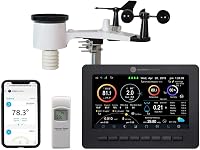
The Ambient Weather WS-2902 includes an outdoor sensor array and an LCD color display. Its measurements include wind speed and direction, temperature, humidity, rainfall, UV and solar radiation.
The console can connect to the Ambient Weather Network, where you can customize dashboard tiles and share local conditions. The station also supports integrations such as IFTTT, Google Home and Alexa.
Consider it if you want both a dedicated display and connected features. The sensor array needs a suitable mounting spot, and the console needs a place indoors.
La Crosse C85845: indoor and outdoor basics on a large display
The La Crosse C85845 shows indoor and outdoor temperature and humidity on a color display. It also offers dew point, heat index, daily high and low records, customizable alerts and a self-setting clock.
Its power adapter supports a constant backlight with adjustable settings. Optional AA batteries provide backup, with a power-saving backlight mode when the unit runs on batteries alone.
Consider it if you want core temperature and humidity readings on a dedicated display. It does not provide the broad wind and rainfall coverage of a full outdoor array.
Tempest Weather Station: no display and solar-powered outdoor sensing
The Tempest Weather Station has no display, so you view its data through its app or supported services. It measures temperature, humidity, pressure, wind, dew point, solar radiation, UV, lightning and rainfall.
Tempest supports Alexa, IFTTT, Rachio and other smart home platforms. Its sensor technology is non-mechanical, and it has no moving parts.
Consider it if you prefer app access and want wind, rain, UV and lightning readings. Make sure you have a suitable outdoor location and are comfortable checking the app instead of a dedicated display.
Ecowitt Wittboy Pro HP2564: console and room to add sensors
The Ecowitt Wittboy Pro HP2564 includes a 7 in TFT display console and a WS90 outdoor sensor. It measures temperature, humidity, wind, UV, light and rainfall, and the console can pair with supported Ecowitt sensors.
The console can send data to Ecowitt Weather and other supported services after Wi-Fi setup. The outdoor sensor uses solar power with battery backup, while the indoor console is corded.
Consider it if you want a display now and the option to add compatible sensors later. Ecowitt notes that WS90 rainfall readings can vary under some conditions; it recommends pairing a WH40 rain gauge if precise rain data is important.
What mounting and setup choices affect accuracy?
A stable mount and suitable exposure help the sensors report the conditions you want to track. Plan the mounting location before you buy, especially if you need clear wind exposure or a long wireless link.
Check how the station attaches and whether the pole or mounting hardware is included. Confirm the path between the sensor and console, since walls and other obstacles can shorten wireless range.
Once installed, allow the station's sensors and forecast features to settle according to the setup instructions. Our guide to calibrating a weather station at home covers what to check when readings seem off.
What should you decide before buying?
Write down your must-have readings, the place you can mount sensors and how you want to view data. Those three choices narrow the field faster than comparing every feature on every station.
Then check power needs, network support and any expansion options. If your main interest is wind and rain exposure, compare outdoor weather stations for wind and rain.
If connected features matter most, browse our smart weather station guide and confirm support for the services you use.
Which backyard weather station should you choose?
Choose a console-based station if you want to glance at readings without opening an app. Pick an app-first system if remote viewing and integrations matter more, or a flexible console if adding sensors is part of your plan.
Before mounting, match the station to your yard and the readings you care about. Start with our best weather stations for home use to compare options against those needs.
Frequently asked questions
What should I look for in a backyard weather station?
Start with the measurements you will use, such as temperature, humidity, wind and rainfall. Then check whether the sensor can go in a suitable open spot, how readings reach the display or app, and what power each part needs.
Choose extra sensors or smart home links only if you expect to use them.
Do backyard weather stations need Wi-Fi?
No. A station can send readings wirelessly to a dedicated console without connecting to the internet.
Wi-Fi matters when you want remote access, online weather services, alerts or smart home features, so check which functions work locally and which need an internet connection.
Where should I put an outdoor weather station?
Place sensors where buildings, trees, walls and pavement are least likely to distort the reading, and follow the station's mounting guidance.
Wind sensors need open exposure, while temperature readings can be skewed by direct sun or heat from nearby surfaces. Check signal range and access for maintenance before mounting.
Is a station with more sensors always better?
More measurements help when you will use them, but they can add setup, placement and upkeep needs.
A basic indoor and outdoor temperature station can suit simple checks, while a full sensor array may fit buyers who want wind, rain, UV or solar readings. Match each sensor to a real use.
Can I add sensors to a weather station later?
Some systems support extra sensors, while others are designed as a fixed set.
Check the console's supported sensor types and limits before you buy if you may want soil, pool, air quality or additional temperature readings later. Confirm that the added sensors work with your chosen console and app.