How Does a Home Weather Station Work?
A home weather station works by measuring local conditions with sensors and sending the readings to a display or app. To understand how a weather station works, start with the readings you need and where you can place its outdoor sensors.
On this page (10 sections)
- What does a home weather station measure?
- How do weather station sensors collect readings?
- How do readings reach the display or app?
- How does a station turn measurements into a forecast?
- Do you need Wi-Fi for a weather station?
- How do you choose a weather station?
- How do you set up and care for a home weather station?
- What common mistakes can affect weather station readings?
- Which weather station fits your setup?
- How does a weather station work, and which one should you choose?
A home weather station works by measuring local conditions with sensors and sending readings to a display or app. If you're asking how a weather station works because you want to buy one, first decide which measurements matter and whether you want to read them at home, on a phone, or both.
Most systems combine an outdoor sensor or sensor array with a console, app, or both. The outdoor unit measures weather near your home, then sends readings wirelessly to the indoor equipment, where you can view them and, depending on the model, see trends, alerts, or a forecast.
What does a home weather station measure?
A home weather station measures the conditions its sensors are designed to detect. Common readings include temperature, humidity, wind speed and direction, rainfall, and barometric pressure.
Some models also report dew point, heat index, UV, solar radiation, or lightning. Extra measurements are useful when they answer a question you actually have, such as whether strong wind is approaching your garden or how much rain fell nearby.
Indoor readings can help you compare room conditions with the outdoors. Forecasts and calculated values, such as feels-like temperature, use measurements in addition to the sensors themselves, so check which readings your preferred station includes.
How do weather station sensors collect readings?
Outdoor sensors respond to local conditions and turn them into values the station can process. A single array may group several sensor types together, while other systems use a compact device with multiple measurement functions.
A thermometer measures air temperature, and a humidity sensor estimates moisture in the air. Wind instruments measure speed and direction, while a rain gauge collects precipitation for measurement.
How does a weather station measure wind?
A station measures wind speed and direction with a wind sensor, often an anemometer and a wind vane. The anemometer measures wind speed, while the vane indicates the direction the wind comes from.
Some stations use non-mechanical sensors. Our guide to ultrasonic versus mechanical anemometers explains how those approaches differ and what to consider when choosing between them.
How does a weather station measure rain?
A rain gauge collects water and measures how much falls into its opening. In a tipping-bucket design, collected water tips a small bucket after reaching a set amount, and the station counts the tips.
Leaves, dirt, and poor placement can interfere with collection. Read more about how a tipping-bucket rain gauge measures rain before deciding where to mount one.
Why does sensor placement matter?
Placement matters because a sensor measures the conditions where it sits. Direct sun, warm walls, roofs, trees, and pavement can change the conditions around a sensor or block its exposure to wind and rain.
Choose a position that suits the readings you care about, and follow the mounting instructions for the station. The backyard weather station guide covers site selection, mounting, and other choices to make before installing an outdoor array.
How do readings reach the display or app?
A wireless sensor sends readings by radio to a console or gateway. The console displays the information on a screen, while a station with Wi-Fi can also send data to an app or online service.
The radio connection between the sensor and console is separate from the console's internet connection. A local console can show readings without Wi-Fi, while internet access is useful for remote viewing, online dashboards, and some smart home functions.
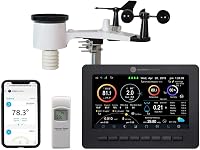
The AcuRite Iris 01512 pairs an outdoor sensor with a color display for viewing indoor and outdoor conditions. Its screen makes sense if you want to check readings inside without reaching for a phone.
The Tempest Weather Station has no display, so it suits an app-centered setup. It measures wind, rain, temperature, humidity, UV, and lightning, and its outdoor sensor sends readings wirelessly.
How does a station turn measurements into a forecast?
A station may combine current conditions and recent trends to estimate what weather could come next. Barometric pressure is one input that some systems use to calculate a forecast.
A home station's forecast is tied to its location and to the way that model processes readings. Treat it as a local planning aid, and continue to follow regional forecasts and official warnings for broader conditions.
The AcuRite Iris 01512 combines elevation data with barometric pressure data to provide a forecast for the next 12 hours. That forecast feature is separate from its measurement of current outdoor conditions.
Do you need Wi-Fi for a weather station?
You don't need Wi-Fi to view readings on a compatible local console. Wi-Fi can add remote monitoring, online dashboards, alerts, and smart home connections, depending on the model.
The Ambient Weather WS-2902 sends sensor readings wirelessly to its console, and its console connects to Wi-Fi for remote monitoring and alerts. Choose it if you want both an indoor color display and access to backyard data when you're away.
If a screen at home is enough, a console-based model may suit you better than an app-only setup. For help comparing connected options, see our smart weather station guide.
How do you choose a weather station?
Choose a station by matching its readings, display, and connection options to the way you'll use it. A large list of measurements is useful only when those readings help with a real decision in your home or yard.
Start with your must-have measurements. A gardener may care most about rain, temperature, and wind.
Someone setting up weather alerts may want internet access and a compatible app. If you want to compare how measurement coverage varies, the 7-in-1 versus 5-in-1 weather station guide explains what an added sensor can bring.
Next, decide how you want to see the data. A console gives you a dedicated screen at home, while a station without one relies on an app or connected service.
If you'd rather check readings at a glance indoors, choose a model with a display; if you mainly want phone access, an app-centered station can fit that routine.
Finally, check where the outdoor unit can go and how it gets power. Consider the distance and obstacles between sensor and console, the mounting position, and whether the setup suits your property before you buy.
How do you set up and care for a home weather station?
Set up the outdoor sensors in a suitable location, connect them to the console or gateway, and confirm that readings arrive before relying on the station. Follow the instructions for the specific model because mounting and connection steps vary.
For the AcuRite Iris 01512, setup includes installing batteries and attaching the wireless outdoor sensor to a pole or post with its included bracket. The Tempest is solar powered, and the Ambient Weather WS-2902 sensor array uses a solar panel with optional battery backup.
After installation, check that the console receives readings and that the values make sense for the conditions around the sensors. Keep the rain gauge opening clear, make sure the sensor stays securely mounted, and check batteries or power if readings stop updating.
Don't try to fix every odd reading with calibration. First look for a blocked sensor, heat reflected from a nearby surface, a connection problem, or a mounting issue.
Our home weather station calibration guide explains when calibration checks make sense.
What common mistakes can affect weather station readings?
Poor exposure and blocked sensors are common causes of unhelpful readings. A temperature sensor placed in direct sun or beside a warm wall may reflect that spot instead of the broader outdoor air around your home.
Wind readings need open space so nearby structures and trees don't distort airflow. A rain gauge needs a clear opening and a stable position, and a sensor array should be mounted where it can collect the conditions you're trying to monitor.
Avoid assuming that one outdoor location works equally well for every sensor. A radiation shield can limit direct solar heating around a temperature sensor; learn whether your weather station needs a radiation shield before settling on a mounting spot.
Which weather station fits your setup?
The right choice depends on whether you want a dedicated screen, app access, or both. Among these three options, the AcuRite Iris 01512 fits a display-first household, the Tempest fits an app-centered setup, and the Ambient Weather WS-2902 covers buyers who want a console and Wi-Fi.
Choose the AcuRite Iris 01512 if you want to read local conditions on a color screen and also see indoor measurements. Skip it if app access away from home is the main reason you're buying a station.
Choose the Tempest Weather Station if you want a broad set of readings in an app-centered system and don't need a display. Skip it if you want a dedicated indoor screen to check without opening an app.
Choose the Ambient Weather WS-2902 if you want a color console, Wi-Fi features, and remote monitoring and alerts. Skip the added internet features if you only need a simple screen with local readings.
How does a weather station work, and which one should you choose?
To decide how a weather station works for your routine, match its sensors and connection options to where you'll use the readings. Pick the AcuRite for a dedicated display, the Tempest for app access without a console, or the Ambient Weather WS-2902 for a console plus Wi-Fi monitoring.
Before you buy, settle on the outdoor mounting location and decide which measurements you'll check regularly. Then use the backyard weather station guide to review placement and setup choices for your yard.
Frequently asked questions
How does a home weather station work?
A home weather station measures conditions such as temperature, humidity, wind, rainfall, or pressure with sensors. A wireless signal sends those readings to a console or app, where you can view current conditions and, on some systems, trends, alerts, or a forecast.
Sensor coverage and display options vary by model.
Does a home weather station need Wi-Fi?
No. Many stations send readings from outdoor sensors to a nearby console by radio, so you can see local data without Wi-Fi.
Wi-Fi helps when you want remote access, an online dashboard, or smart home features.
Check which functions your chosen model offers through its internet connection.
How does a weather station measure rain?
A rain gauge collects water and measures the amount that enters it. In a tipping-bucket design, collected rain tips a small bucket at a set amount, and the station counts those tips to estimate rainfall.
Keep the opening clear and follow the mounting guidance for useful readings.
Where should I put a home weather station?
Choose an outdoor location with open exposure to the conditions you want to measure, and follow the manufacturer's mounting instructions. Keep temperature sensors away from direct sun and heat from walls or pavement, and give wind sensors space from obstructions.
The right position depends on the sensor design and your yard.