Ultrasonic vs Mechanical Anemometer: Which Is Better? (October 2026)
Choose an ultrasonic anemometer for wind sensing without moving parts; choose a mechanical one if you prefer a traditional cup-and-vane design. For a home station, match the sensor to your mounting location, display preference and other weather readings.
On this page (7 sections)
- How does an ultrasonic vs mechanical anemometer work?
- Does ultrasonic sensing give more accurate wind readings?
- Which ultrasonic weather station fits your setup?
- Which station works if you want a display?
- How should you set up and care for an anemometer?
- What should you compare before choosing an anemometer?
- Which anemometer should you choose for a home weather station?
For ultrasonic vs mechanical anemometer choices, ultrasonic sensing suits buyers who want a wind meter without moving parts; a mechanical design suits buyers who prefer a familiar cup-and-vane sensor. The right home weather station also needs a suitable mounting spot, a display or app you’ll use, and the other readings you want.
An ultrasonic anemometer estimates wind with sound signals between sensors. A mechanical anemometer uses moving parts to respond to wind speed and direction.
The Tempest uses a non-mechanical wind sensor, and the Ambient Weather WS-5000 has an ultrasonic sensor array. The AcuRite Iris and Ambient Weather WS-2902 report wind speed and direction, but their sensor type isn't specified here.

How does an ultrasonic vs mechanical anemometer work?
An ultrasonic anemometer estimates wind without rotating cups; a mechanical anemometer relies on moving hardware. That distinction affects the sensor’s design and upkeep, but it doesn’t decide which complete station is right for your home.
A typical mechanical sensor uses cups that turn in the wind and a vane that points with its direction. Because these parts move, they need to remain clear and free to turn.
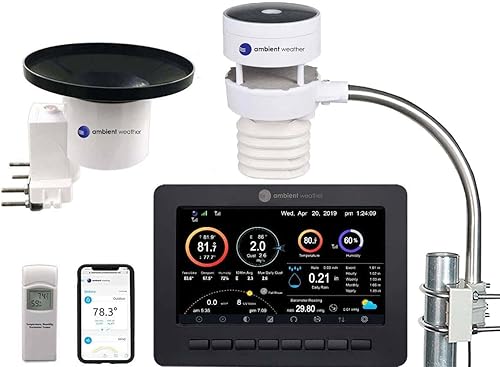
An ultrasonic sensor estimates wind from sound signals traveling between sensor points. The WS-5000 uses an ultrasonic array with no moving parts in its wind meter.
Both styles need an unobstructed position for useful wind readings. A sensor mounted beside a wall, roof edge or tree can reflect local airflow rather than the wind you want to monitor.
What does ultrasonic vs mechanical anemometer mean for upkeep?
Ultrasonic wind sensing removes moving cups and bearings from the wind meter, while a mechanical sensor has moving parts to inspect. Neither design means the whole weather station needs no care.
Outdoor sensors can collect dust, pollen, leaves or other debris. Inspect the sensor and its mount from time to time, keeping them clear and secure according to the station’s instructions.
With a mechanical sensor, check that the cups and direction vane can move freely. With either type, inspect the mount and confirm the array remains in its intended position.
If you want to understand the other instruments that may share an outdoor array, read how a home weather station works. This can help you separate wind-sensor upkeep from care for the rain gauge and other measurements.
Does ultrasonic sensing give more accurate wind readings?
An ultrasonic sensor isn't automatically more accurate in every installation. Placement and exposure matter because nearby structures can change the airflow before it reaches the sensor.
Choose an open location where practical, and follow the station’s guidance for mounting height, clearances and alignment. Check trees, buildings and rooflines around the sensor, not just whether the mount has a clear view of the sky.
Ambient Weather describes the WS-5000’s ultrasonic anemometer as more sensitive to changes in wind speed and direction than traditional wind-cup designs. That feature may appeal if you care about changes in wind, but it doesn't guarantee more accurate readings in every yard.
Our weather station calibration guide explains why setup and calibration matter when you’re checking readings. Avoid changing calibration to compensate for a poor location, since the airflow itself may be the problem.
What does the update interval tell you?
An update interval tells you how often a station reports new data, not whether every reading is accurate. Tempest sends updates every 3 seconds, while the WS-5000 updates every 5 seconds.
A shorter interval can suit you if you check changing conditions often. It won’t replace good exposure, correct setup or a clear understanding of which readings the station shows.
Which ultrasonic weather station fits your setup?
Choose a station based on how you’ll view and use its data, then confirm its wind sensor design. A no-display model and a console-based model can both use non-mechanical sensing while serving different routines.
Tempest combines a non-mechanical wind meter with temperature, humidity, pressure, rainfall, solar radiation, UV and lightning readings. It’s solar powered, connects to its app and Alexa, and has no display.
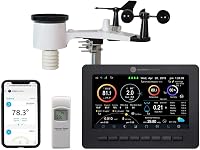
The WS-5000 pairs an ultrasonic sensor array with a full-color TFT LCD console. It includes a rain cup and supports smart home connections, making it a fit if you want to check station data on a screen indoors.
These two options make the sensor type clear, but they suit different ways of checking weather. If you want more station choices focused on outdoor readings, see our outdoor weather stations for wind and rain guide.
Which station works if you want a display?
Pick a console-based station if you want readings visible indoors; pick Tempest if app access works for you. A display preference is separate from the choice between ultrasonic and mechanical sensing.
The WS-5000 includes a full-color LCD console. The AcuRite Iris has a large color LCD and reports wind speed and direction, though its anemometer type isn't specified here.
The WS-2902 also includes a color LCD and Wi-Fi features for remote data access. It measures wind speed and direction, but its anemometer design isn't specified here.
If you’re choosing between an indoor console and app-based access, compare weather stations with a display vs app-only stations. If the range of measurements matters more, see what a 7-in-1 weather station adds over a 5-in-1.
How should you set up and care for an anemometer?
Mount the sensor where wind can reach it, secure the hardware and keep the sensor clear. Then place the console or app where you can check readings and confirm the station has a reliable connection.
Before mounting, read the station’s instructions and check the required pole or bracket. For example, the WS-5000 array uses a mounting bracket, and its console should be placed where it can receive the outdoor sensor’s signal.
After installation, check that the array sits as intended and that nearby trees, walls or roof edges aren’t blocking wind. Keep the sensor clear of leaves and other debris, and inspect mounting hardware periodically.
A common mistake is treating a solar-powered outdoor sensor as if it needs no attention. Solar power reduces the need for a separate power source on models that use it, but it doesn’t prevent debris buildup or loosened hardware.
Another mistake is comparing readings from sensors installed in different locations as if sensor style were the only difference. Exposure, obstructions and setup can affect what each station reports, so make the mounting conditions as similar as possible when comparing them.
Use the roof mount or tripod guide to weigh mounting options before installation. Choose a position you can inspect safely and reach for routine care.
What should you compare before choosing an anemometer?
Compare confirmed sensor type, display, power, connectivity and mounting needs for the exact station. Then check that it measures the other conditions you care about.
Use this checklist before you buy:
- Sensor type: Is the wind sensor explicitly described as ultrasonic, non-mechanical or mechanical?
- Display: Do you want a console indoors, or will app readings work for your routine?
- Power: Check whether the outdoor array uses solar power, batteries or another stated source.
- Connectivity: Confirm which app, Wi-Fi or smart home features the station supports.
- Mounting: Check the pole, bracket, alignment and location requirements before installation.
- Other readings: Make sure it measures the conditions you care about, such as rainfall, temperature, UV or lightning.
- Upkeep: Decide whether you’re comfortable inspecting moving cups and a vane, or prefer a wind sensor without those parts.
Don’t infer a sensor type from a station’s brand or from the fact that it reports wind speed and direction. If the type isn’t stated, treat it as unknown and decide based on the features you can confirm.
Don’t choose on update frequency alone either. A fast update cycle can be useful, but it doesn’t fix a poorly placed sensor or tell you whether the station includes a console.
Which anemometer should you choose for a home weather station?
Choose an ultrasonic anemometer if you want wind sensing without moving parts; choose a mechanical one if a traditional cup-and-vane design and its confirmed features suit your needs. Then make the final call based on location, display and the station’s other measurements.
Tempest suits an app-first setup with a non-mechanical sensor. The WS-5000 suits a console-first setup with an ultrasonic array and a full-color display.
Choose the Iris if its large color screen and wind readings matter more than knowing the sensor type. Consider the WS-2902 if Wi-Fi, remote access and a color display are your priorities.
Skip a station when its sensor design, mounting needs or way of showing data conflicts with what you want. For a broader comparison of station features and placements, start with our backyard weather station guide.
Frequently asked questions
What is the difference between an ultrasonic and mechanical anemometer?
An ultrasonic anemometer estimates wind using sound signals between sensors, while a mechanical anemometer uses moving parts such as cups and a vane. Ultrasonic designs avoid wear on those moving parts, but sensor style alone doesn't determine how well a station fits your home or how accurate its readings will be.
Is an ultrasonic anemometer more accurate?
Ultrasonic sensing isn't automatically more accurate in every home weather station. Placement, exposure, calibration, nearby obstacles and the full sensor design affect readings, so compare the station's features and follow its installation guidance.
Do ultrasonic anemometers need maintenance?
An ultrasonic wind sensor has no cups or bearings to maintain, but the outdoor array still needs periodic inspection. Keep it clear of debris, check the mount and follow the station's care instructions.
Does the Tempest Weather Station have a display?
No. Tempest has no display, so you view its weather information through its app.
Choose a station with a console, such as the Ambient Weather WS-5000, if you want a dedicated screen indoors.
What should I check before installing a weather station?
Check the station's mounting instructions, required clearances and radio or Wi-Fi range before choosing a location. Aim for open wind exposure where practical, and compare roof and tripod options with this weather station mounting guide.