How to Set the Time on an Ambient Weather Station
Set the clock on an Ambient Weather console by opening the time or clock menu and adjusting the hour and minute, or let the station pull the correct time from your Wi-Fi network and the Ambient Weather Network. The console clock, the online dashboard, and daylight saving all need to agree.
On this page (8 sections)
- How do you set the time on an Ambient Weather console by hand?
- Where is the clock menu on an Ambient Weather display?
- How do you sync the station clock with Wi-Fi and the network?
- How do you fix the time zone and daylight saving setting?
- Why does the time keep drifting after you set it?
- How do you match the app and online dashboard to the console clock?
- Can you set the clock without Wi-Fi?
- Which station makes clock setting easiest?
You can fix a wrong clock two ways. Set the time by hand on the console buttons, or let the station sync from Wi-Fi and the Ambient Weather Network.
The network route is the one that stays correct.
This guide walks through both routes for Ambient Weather consoles. It also covers daylight saving, time zone mistakes, and what to check when the clock keeps slipping.
That covers ambient weather how to set time in the order most owners need it.
How do you set the time on an Ambient Weather console by hand?
Open the console's time or clock setting, then change the hour and minute with the up and down buttons. Press the set or enter key to save, and the seconds reset when you confirm.
On color consoles the clock sits on the main screen or one swipe away. The buttons along the bottom move between fields, and the plus and minus keys adjust the blinking value.
Hold a key to move faster through the hours.
Do this with the console plugged into its AC adapter. The included adapter keeps the clock steady, while batteries alone can let it drift.
Do the manual set first if the station is not on Wi-Fi yet.
The WS-2902 ships with an AC adapter in the box, so the console can run on wall power from day one. Keep the three AAA batteries as backup for a power outage.
The solar panel on the sensor array charges the super capacitor and feeds the sensor side, but it never touches the console clock. If the power drops and the batteries are weak, the clock loses its count and needs a fresh set.
Where is the clock menu on an Ambient Weather display?
The clock menu lives in the settings area reached from the main screen, usually behind a set or menu key rather than on the weather dashboard. Look for a small clock icon or the word TIME on the display bezel.
The WS-2902 console uses an LCD color screen with a row of labeled buttons under it. You cycle into setup with the set key and step through fields in order.
On the WS-5000, the larger TFT color display shows a clock panel you can reach with the on-screen controls.
Reading the two Ambient Weather displays
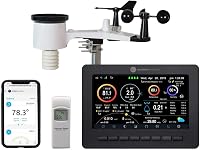
The WS-2902's LCD color display is the compact one. It shows indoor and outdoor temperature in F and C, humidity, dew point, heat index, wind chill, barometric pressure, wind speed and direction, rainfall, UV, and solar radiation.
The clock shares space with all of that, so expect to step through several fields before you reach the hour.
The WS-5000's TFT full color screen is the larger panel and carries more on screen at once. Its included indoor and outdoor thermo-hygrometer-barometer feeds indoor temperature, humidity, and pressure, while the ultrasonic array handles wind.
The clock panel is easier to find here because the display splits the readings into clearer tiles.
Write down the current values before you change them. If you misstep and change the barometric pressure or rain total by accident, you can put the old number back.
How do you sync the station clock with Wi-Fi and the network?
Let the console join your Wi-Fi and it will pull the time from the network automatically. This is the setting most owners should use, because it removes the manual step and fixes drift on its own.
The WS-2902 and WS-5000 both connect over 2.4 GHz Wi-Fi. Enter your network name and password in the console's Wi-Fi setup, then confirm the station shows as online in the Ambient Weather Network.
Once online, the network time update sets the clock and adjusts for daylight saving. If the hour is still wrong after a successful connection, the time zone or daylight saving setting is the likely cause.
If you are still setting the station up, our walkthrough on how to set up a home weather station covers mounting, pairing the sensor array, and getting the console online in the right order. Connect the network before you fine-tune the clock.
How do you fix the time zone and daylight saving setting?
Set the time zone to the station's location and turn daylight saving on or off to match your area. A zone error moves the clock by whole hours, while a daylight saving error moves it by exactly one.
Eastern, Central, Mountain, and Pacific zones each shift the displayed time. Pick the zone of the backyard where the sensor array sits.
Setting a station from another state leaves every reading timestamped in the wrong hour.
Daylight saving is a separate setting. Most US households want it on in spring and off in fall.
If the clock is one hour ahead or behind right after a seasonal change, this toggle is the fix, not the manual hour buttons.
The time zone also steers how the Ambient Weather Network stamps your data. A zone that is off by one step makes the rainfall chart show a burst at the wrong hour and puts your shared conditions at the wrong time of day.
That matters most if you use the community feed or share hyperlocal conditions to social.
Why does the time keep drifting after you set it?
A station clock drifts when it runs on batteries without network updates, or when the Wi-Fi link is weak. The internal clock is good but not perfect, so it needs the network to stay exact.
Check three things in order. First, confirm the console shows a Wi-Fi connection and is not dropping in and out.
Second, keep it on the AC adapter. Third, verify the time zone again after any network change.
A router that runs only 5 GHz leaves the console offline. The WS-2902 needs 2.4 GHz, so a band split or a guest network with the right band solves a stubborn connection.
On the WS-2902 the sensor array talks to the console over 915 MHz RF, separate from the Wi-Fi link. That RF signal reaches up to 330 feet line of sight in open air, or about 100 feet under most conditions.
A weak RF link breaks the readings, not the clock, but a console that keeps dropping its sensor connection is also often the one sitting too far from the router.
The WS-5000's sensor array reaches up to 1,000 feet line of sight in open air, or about 300 feet under most conditions. It still needs the console on 2.4 GHz Wi-Fi for the time to update.
Its ultrasonic array has no moving parts, so wind speed and direction update every five seconds, but the clock sync still depends on the network link.
How do you match the app and online dashboard to the console clock?
Correct the console first, then let the app refresh from it. The online dashboard reads what the station sends, so the app is a follower, not a setter.
Open the Ambient Weather Network dashboard after the console is online and pull to refresh. Timestamps on the graphs should match the console clock within a few minutes.
If they do not, check that the station is listed as online and sending data.
Once the station is online you can also set alerts and program smart home routines through IFTTT, Google Home, and Alexa. Those rules run on the time the station reports.
A clock that is off by an hour fires a morning alert at the wrong hour, so correct the time before you build automation around it.
Can you set the clock without Wi-Fi?
Yes, the manual buttons work with no network at all. This is the fallback for a station in a barn, at an off-grid cabin, or on a router the console cannot reach.
The catch is drift and daylight saving. You will need to nudge the clock by hand after seasonal changes and every so often to correct small errors.
A solar-powered sensor array and battery backup keep the console running, but neither sets the time.
If the clock matters to you more than the station's network features, a device that sets itself from the cloud is the easier path. The Tempest vs Ambient Weather comparison covers how the two handle time and connectivity.
Which station makes clock setting easiest?
A Wi-Fi station with network time is the simplest choice, because the clock stays right without you touching a button. That is the WS-2902, and it is the one we would pick for most homes.
Its console takes the time from the Ambient Weather Network once online, handles daylight saving, and shows the hour large on the color LCD. The manual buttons are there as a backup.
For a step up in sensors and display, the WS-5000 adds an ultrasonic array and a TFT screen that shows the clock clearly. Its array reads wind without moving cups, and the kit adds a rain cup plus an indoor thermo-hygrometer-barometer.
The Tempest skips the console entirely. Its time lives in the app and the cloud, so there is no display clock to correct.
That suits someone who checks weather on a phone. Its solar-powered sensor sends updates every three seconds and reaches up to 1,000+ feet wirelessly, and it detects lightning strikes as well as the usual readings.
There is no clock menu to hunt for, but there is also no standalone display to glance at.
For the full field, see our guide to the best Ambient Weather stations. If you are weighing brands before buying, the Ecowitt vs Ambient Weather comparison covers how each handles setup and the clock.
To close it out: fix ambient weather how to set time by connecting the console to Wi-Fi and letting the network do it. Set the time zone and daylight saving correctly, keep the AC adapter plugged in, and only use the manual buttons when there is no network.
Correct the console first, then refresh the app to match.
Frequently asked questions
Why does my Ambient Weather station show the wrong time?
The console usually holds a clock that drifted or was set by hand before Wi-Fi was connected. Reconnect it to your 2.4 GHz network and confirm the time zone, since a zone mismatch is the most common cause of an hour or more of error.
Does the Ambient Weather station set its own time?
Yes, once the console is on Wi-Fi it syncs time from the network. A station that never joined Wi-Fi keeps running on its internal clock, so connect it first and only adjust by hand when you have no network.
What time zone should I choose on an Ambient Weather console?
Pick the zone where the station sits, not where you are when you set it. A backyard station in Eastern Time needs Eastern even if you set it up while traveling, and daylight saving should be on for most US households.
How do I stop my station clock from drifting again?
Leave Wi-Fi connected so the station re-syncs, and keep the console on its AC adapter rather than batteries alone. A stable power source and a strong 2.4 GHz signal keep the automatic time updates working.
Does the Ambient Weather app show the same time as the console?
The app reads data pushed from the console, so a corrected console usually corrects the app within a few minutes. If the app still looks off, refresh the dashboard or check that the station is online in the Ambient Weather Network.