How to Reset a La Crosse Weather Station
To reset a La Crosse weather station, unplug the display, remove its backup battery, pull the batteries from every sensor, wait about a minute, then power the display first and the sensors second. Pair each sensor again and give the readings time to come back.
On this page (9 sections)
- When should you reset a La Crosse weather station?
- What you need before you start the reset
- How do you do a full reset, step by step?
- How do you re-pair the sensors after a reset?
- Why does the station keep losing its sensors?
- Which batteries suit a station that's just been reset?
- How do you reset the Wi-Fi connection on a smart station?
- What should you check after the reset?
- How do you avoid needing a reset again soon?
To reset a La Crosse weather station, unplug the display, remove its backup battery, pull the batteries from every sensor, wait about a minute, then power the display first and the sensors second. Pair each sensor again and give the readings time to return.
The steps are simple, but the order matters. Doing the display first and the sensors second makes the reset stick, and it's the quickest fix for stuck readings, a dropped sensor, or a station that won't reconnect to Wi-Fi.
When should you reset a La Crosse weather station?
Reset when the station stops updating, a reading freezes, a sensor drops out, or Wi-Fi won't connect after a router change. A station that updates normally doesn't need a reset.
A soft reset is the first thing to try. Pull the display's power adapter and backup battery for about a minute, then restore it.
That clears minor glitches without wiping your saved high, low and rain totals.
A full reset goes further. It removes the backup battery from the display and takes the batteries out of every outdoor sensor.
This clears the pairing and stored data, so you'll set the station up again. Save any rain or high/low figures you want to keep first.
If the trouble comes back within days, check the battery age and the sensor distance before resetting again. A weak AA cell in a wind or rain sensor can mimic a dead sensor.
What you need before you start the reset
Have fresh AA batteries, the manual, and a small screwdriver ready before you touch the station. Many La Crosse sensor housings use small screws on the battery door, so you'll want the driver within reach when you're up at the mount.
Plan the timing too. A full reset clears stored readings, so write down any totals you care about first.
Keep the manual handy for the pairing steps, since the button sequence differs between a basic station and a Wi-Fi model.
Check that you can safely reach the sensors. A roof mount means climbing, and you should never do that in wind or wet weather.
If the sensors sit somewhere awkward, a weather station roof mount on a tripod or a fence post puts them within arm's reach next time.
How do you do a full reset, step by step?
Power down the display, remove its backup battery, strip the batteries from all sensors, wait 60 seconds, then bring the display up first and the sensors one at a time. This order lets the display find each sensor's signal cleanly.
- Unplug the display's power adapter from the wall.
- Open the battery cover and take out the backup coin cell or AA cells.
- Open every sensor's battery door and remove its batteries.
- Wait about a minute so the station's memory fully clears.
- Reconnect the display's power adapter and backup battery.
- Add batteries to each sensor one at a time, starting with the one nearest the display.
Keep the sensors close to the display while you re-pair them. La Crosse outdoor sensors reach up to about 400 ft in open air on a model like the V42-PRO, but a wall or roof between them weakens the signal.
Once each sensor shows up on screen, move it back to its mounting spot.
After a full reset, the clock, units and Wi-Fi settings usually need to be set again. Our walkthrough on how to program la crosse weather station covers the display buttons and the app setup.
How do you do a soft reset?
A soft reset only touches the display. Unplug its power and remove the backup battery, wait a minute, then put the battery back and plug the adapter in.
Your sensor pairings and stored readings usually survive this, which makes it the safer first step when the screen freezes or a single reading looks odd.
How do you re-pair the sensors after a reset?
Bring each sensor close to the display and add its batteries one at a time. La Crosse sensors send their signal on their own schedule, so giving each one a moment to be seen stops the display from missing a channel.
Start with the temperature and humidity sensor, then the wind and rain unit. Hold each near the display, fit its batteries, and wait for the reading to appear before moving on.
On models that use numbered channels, set the channel switch on the sensor and match it on the display.
Once a sensor shows up, move it back to its mount and confirm the reading holds. A sensor that drops out when it's far away is telling you the range is too long or the batteries are weak, not that the reset failed.
If the app still won't find the station, open the app's device list and remove the old entry, then add the station again. The reset clears the link on the station's side, but the app can keep a stale copy until you remove it.
Why does the station keep losing its sensors?
The usual cause is weak batteries, not a bad station. Lithium AA cells keep a steadier voltage in cold weather than alkaline ones, so a sensor that dies every winter is often just running the wrong cell type.
Range is the second cause. The maker's 400 ft figure is for open air, and a wall, a metal roof or a dense hedge all cut into it.
Raise the sensor or move the display closer before you blame the reset.
Interference matters too. A sensor set close to a Wi-Fi router or a metal gutter can lose packets.
A small change in position often fixes a signal that keeps dropping. Check the battery door seal as well, since a damp sensor can reset itself at random.
Our guide to weather station batteries covers which cells suit cold, outdoor sensors.
Which batteries suit a station that's just been reset?
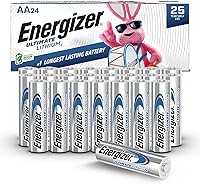
Use lithium AA batteries in the outdoor sensors, and keep a spare set of the same type on hand. Energizer says its Ultimate Lithium AA cells hold power for up to 25 years in storage and work from -40F to 140F, which covers a sensor's outdoor temperature range.
Fresh cells of one type matter more than brand. Don't mix new and used batteries in the same sensor, and don't mix lithium with alkaline.
A mismatched set can cause odd readings that look like a reset problem.
The display's backup battery is a separate item. On a model like the La Crosse V42-PRO, the backup coin cell keeps the data during a power cut; it doesn't run the station.
Fit the correct coin size and leave the main adapter plugged in.
How do you reset the Wi-Fi connection on a smart station?
Reconnect through the app after the station has been reset and the sensors are paired. The display comes back with its Wi-Fi settings cleared, so you'll add the network again from the app or the display's setup menu.
Have your network name and password ready, and use the 2.4 GHz band. Many smart weather stations only join a 2.4 GHz network, so a 5 GHz-only router can leave the station stuck at the connection screen.
Watch the display's Wi-Fi icon during setup. A steady icon means the station has joined; a flashing one means it's still trying.
If it won't connect, move the display closer to the router for the setup, then return it to its spot.
A smart model adds a lot on top of the basic readings. The La Crosse V42-PRO streams AccuWeather forecast data, UV index and air quality when it's online, so a lost Wi-Fi link costs you more than the local wind and rain numbers.
What should you check after the reset?
Confirm that each sensor shows a live reading and that the time and units are correct. Give the station 10 to 15 minutes after pairing before you trust the numbers, since some values settle as the sensor averages them.
Check the rain total and the high/low records if you wanted to keep them. A full reset clears these, so a zero reading is expected, not a fault.
The clock and date are the next thing to set.
Look at the outdoor temperature against a second source. A reading that's far off after a reset usually means the sensor is in direct sun or sitting near a heat source such as an air-conditioning unit.
If the station still won't update, repeat the full reset with the sensors in the same room as the display. A clean re-pair indoors rules out range as the problem before you climb back up.
How do you avoid needing a reset again soon?
Mount the sensors within easy reach and fit lithium batteries before the cold season. A reachable mount means you can change a cell without a roof climb, and a fresh lithium set reduces the winter dropouts that trigger most resets.
Keep the display out of direct sun and away from the router. A steady spot stops the screen from overheating and the Wi-Fi link from dropping.
Clean the rain gauge and the wind cups each season. Debris in the funnel or a stuck anemometer looks like a dead sensor, and a quick clean saves a full reset.
For a model that fits this routine, our roundup of the best la crosse weather station picks cover basic and smart units. Pair the reset steps above with weather station batteries and a reachable weather station roof mount and the station should run without attention for months.
The short version for how to reset a La Crosse weather station: pull the power and backup battery from the display, remove all sensor batteries, wait a minute, then start the display first and add the sensors one at a time. Re-pair, set the clock, and give the readings time to settle.
If the same fault returns within days, suspect the batteries or the sensor distance rather than the station itself.
Frequently asked questions
How long should I leave the batteries out when resetting a La Crosse station?
Pull the power from the display and the batteries from every sensor, then wait about 60 seconds. That pause drains the leftover charge so the station truly starts from zero.
Reinstall the display's power first and add the sensor batteries one sensor at a time.
Will a reset erase my La Crosse station's history?
A full reset clears the station's stored readings and settings, so the high, low, and rain totals start fresh. Wi-Fi settings and app account links may also need to be set up again.
Copy down any totals you care about before you begin.
Do I reset the display or the sensors first?
Start with the display after it has been unplugged and had its backup battery removed. Then power the display and add batteries to each sensor one at a time.
This order lets the display pick up each sensor's signal cleanly.
Can I reset the station without climbing to the sensors?
For the display, unplugging and removing the backup battery is enough. Sensors mounted on a roof need to be reached to change or remove their batteries.
That's why many owners mount sensors on a tripod or fence at a reachable height.