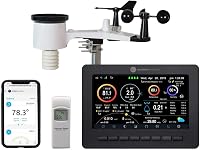
How to Connect an AcuRite Weather Station
To connect an AcuRite weather station, power the outdoor sensor first, then the display, and keep them within radio range while the display searches for the 433 MHz signal. No app or password is needed on the Iris 01512, just batteries and a clear path between the two units.
On this page (9 sections)
- How do you connect an AcuRite weather station out of the box?
- What do you need before you start the setup?
- Where should the outdoor sensor go?
- How do you get the display to pick up the signal?
- Why won't the sensor and display talk to each other?
- How do you set the time, date and forecast?
- What should you check after the first week?
- What do you do if the connection drops later?
- The bottom line on connecting your AcuRite station
To connect an AcuRite weather station, power the outdoor sensor first, then the display, and keep the two units within radio range while the display searches for the signal. The Iris 01512 needs no app, account or password to start, just batteries in the right order and a clear path between the sensor and the screen.
That order matters more than people expect. The sensor starts broadcasting as soon as it has power, so a display switched on afterward finds the signal quickly.
A display left waiting for a sensor that hasn't woken up is the most common reason a first setup seems to fail.
How do you connect an AcuRite weather station out of the box?
Install batteries in the outdoor sensor first, wait a minute, then switch on the color display. The Iris 01512 setup is batteries, a mount, and a short search, with no pairing menu to work through.
Unpack the sensor, the wind cups and vane, the rain gauge parts, and the display. Fit the wind cups and the vane onto the sensor body before it goes up a pole, because both are far easier to handle at table height.
Open the sensor's battery door and load the AAs in the direction marked inside. Close it firmly so the gasket seats, then set the sensor down and give it a minute to begin sending.
Now power the display with its own batteries. Let the screen run its startup sequence and wait for outdoor numbers to appear before touching any buttons.
Pressing keys during the first search interrupts it.
What do you need before you start the setup?
Gather batteries, a Phillips screwdriver, a pole or post, and the mounting bracket before you climb anything. The Iris 01512 arrives with its outdoor sensor, mounting bracket and hardware, and the display.
The station takes 10 AA batteries in total, split between the sensor and the display. Buy a pack of lithium AAs for the outdoor unit so winter mornings don't flatten ordinary cells.
Pick a mounting spot before you power anything. A pole in open lawn gives the wind cups clean air and keeps the rain gauge away from roof runoff.
Fences, sheds and gutter downpipes all disturb one reading or another.
Keep the display indoors on a shelf or wall where you'll actually look at it. The color screen has an adjustable dimmer, so a bedroom or kitchen counter both work.
Where should the outdoor sensor go?
Mount the sensor 5 to 6 feet above ground on open ground, clear of walls, trees and pavement. The Iris 01512 measures wind, rain, temperature and humidity from one outdoor unit, so every reading depends on that spot.
Wind is the fussiest. Put the cups where the prevailing wind reaches them without a building or hedge in the way.
A corner between two walls will swirl the air and undercount speed.
Rain needs a clear cone above the gauge. An eave, a tree branch or a basketball hoop overhead will rob the funnel and make totals read low.
Temperature and humidity want shade and airflow. A sensor in direct afternoon sun reads hot, which is where the radiation shield below earns its place.
Our comparison of the AcuRite Atlas vs Iris covers how the two lines handle sensor siting.
When does a radiation shield help?
Add a shield when your only sensible mounting spot catches direct sun. The AcuRite 06054M shades a compatible sensor and lets air move through, which improves daytime temperature readings.
It hangs from an integrated hanger or a keyhole on the back, and a compatible AcuRite sensor clips inside. The shield fits sensors 592TXR/06002, 606TX/06009, 609TXC and 06045M, so check yours against that list before ordering.
How do you get the display to pick up the signal?
Power the display, wait for the outdoor section to fill in, and leave the buttons alone for a few minutes. The Iris 01512 display searches on its own after startup and locks onto the sensor's 433 MHz broadcast.
Watch the outdoor temperature and wind fields. Dashes mean nothing has arrived yet.
Give it two or three minutes at normal room distance before you start moving hardware.
If the screen stays blank, bring the sensor indoors next to the display and power both again. A reading at close range proves the pair works and points the problem at distance or obstructions rather than the units.
Once numbers appear, walk the sensor back to its mounting spot and confirm the display still updates. If readings drop when you reach the pole, the spot is the issue, not the hardware.
Our guide to why a weather station won't connect to Wi-Fi covers the network side if you later add an online model.
Why won't the sensor and display talk to each other?
Distance, walls and low batteries cause almost every failed connection. Radio at 433 MHz travels well across open ground and poorly through brick, metal siding and foil-backed insulation.
Start with batteries. Weak cells in the sensor can broadcast for a while and then quit, so fit fresh lithium AAs and try again.
Check the polarity inside the door while you're there.
Next, shorten the gap. Move the display to a window facing the sensor and see whether readings return.
If they do, the original indoor spot was too shielded and a nearer wall or window is the fix.
Metal roofs, stucco with wire mesh, and dense evergreens all block the signal. So does a sensor mounted low behind a fence.
Raise it and open the path.
How do you set the time, date and forecast?
Let the display settle first, then set the clock and watch the forecast learn your local pressure. The Iris 01512 runs a self-calibrating barometer that improves over its first weeks.
Set the time and date through the display's buttons once outdoor readings are stable. A clock set during the initial search can get skipped, so do it after the sensor links.
The forecast is the part that needs patience. The station takes thousands of pressure readings at 12-minute intervals and builds a running average for your elevation.
AcuRite says the self-calibrated pressure is reasonably accurate after about 14 days, and the algorithm keeps refining beyond that.
Don't judge the 12-hour forecast on day one. Give it a couple of weeks of steady readings before you trust it over the sky outside your window.
For broader options when you want an app and online history, see our roundup of the best Ambient Weather stations.
What should you check after the first week?
Confirm every reading is still updating and that the rain gauge hasn't clogged. A station that connected fine can still drift once spiders, pollen and leaf litter move in.
Look at wind direction after a windy day. A vane that sticks or spins freely when the air is still needs a check on its mount.
Compare the cups for wobble and clear any debris from the bearing area.
Tip a little water through the rain funnel and watch the total move on the display. A blocked funnel usually shows as a long run of dry days while the garden is soaking.
Check the battery indicator on the display if yours shows one. Cold nights are the real test, and lithium cells in the sensor are what carry the station through them.
Wipe the solar panel and the screen, and tighten the pole if it has started to lean. Small shifts in the mount throw off wind direction more than anything else.
What do you do if the connection drops later?
Power-cycle the sensor and display in the same order as the first setup. Take the batteries out of the outdoor unit, wait a minute, refit them, then restart the display and let it search.
If that doesn't restore readings, bring the sensor indoors and repeat the close-range test. A unit that won't talk across a table needs a battery check or a support call.
A stubborn display can be cleared with a reset. Follow the steps in our guide to how to reset my AcuRite weather station and start the pairing process fresh.
Before you climb up to the sensor, rule out the easy causes. Fresh batteries, a shorter distance and a clear line of sight fix most dropouts without touching the mount.
The bottom line on connecting your AcuRite station
Connect the AcuRite weather station by powering the outdoor sensor first, then the display, and letting it find the signal on its own. Keep the pair within radio range, mount the sensor in open ground, and give the forecast two weeks to learn your local pressure.
If your first attempt didn't take, start with batteries and distance before anything else. Those two fixes solve most setups without a reset or a support call.
When the display is running and the readings are steady, the station is doing its job, and the rest is placement and a yearly battery change.
Frequently asked questions
How far can the AcuRite sensor be from the display?
The Iris 01512 runs on 433 MHz radio, and that band reaches much farther outdoors than through walls. Keep the display and sensor on the same side of the house where you can, and shorten the gap if readings drop out.
Why does my AcuRite display show dashes instead of numbers?
Dashes mean the display hasn't received a reading yet. Power the outdoor sensor first, wait a minute or two, then power the display and let it search before you press any buttons.
Do AcuRite stations need Wi-Fi to show readings?
No. The Iris 01512 sends data from the sensor to the color display over 433 MHz radio, so indoor and outdoor readings work without a network.
Wi-Fi matters for models that upload to an app or online account.
How often should I change the batteries?
Plan on fresh cells about once a year in the outdoor sensor and the display, sooner in hard freezes. Use lithium AAs in the sensor so cold mornings don't drain them before the sun comes up.
Can I connect more than one sensor to the display?
The Iris 01512 is built around its bundled outdoor sensor, which covers wind, rain, temperature, and humidity. Check an AcuRite support page or the box insert if you want to pair extra sensors or a second display.